
Recover Whatsapp Chat Older Than Seven Days.
If you want to restore chat which is older than seven days then follow below given methods. There are two methods through which you can recover deleted whatsapp messages which is older than seven days.
Method 1:- Recover Whatsapp Messages Through Software.
Note:- After connecting mobile phone with PC/Laptop via USB enable the USB Debugging option in the mobile phone. Simply Go Developer option >>> USB Debugging and enable it.
Step 1:- First download Android Data Recovery Software. It will restore your all whatsapp data like messages, images, audio and videos.
Step 2:- After installing Android Data Recovery connect your mobile phone with PC/Laptop via USB.
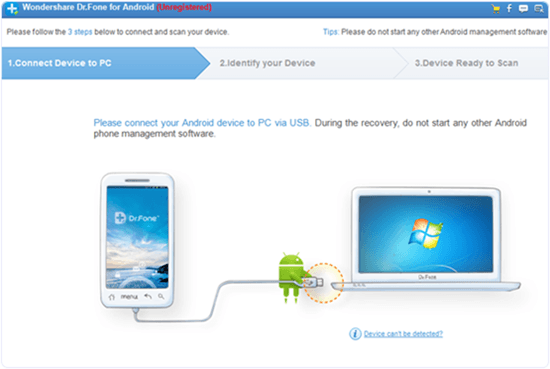
Step 3:- It will automatically detect your device and start processing. After that click on Next and select option what you want to recover.
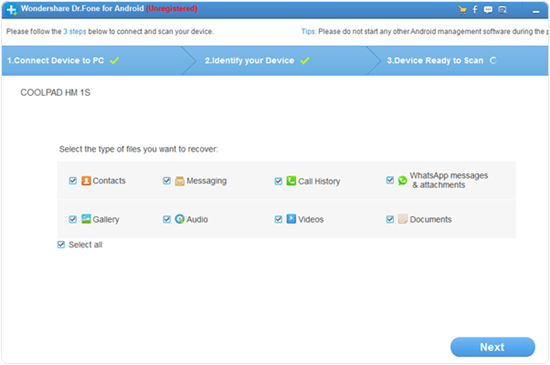
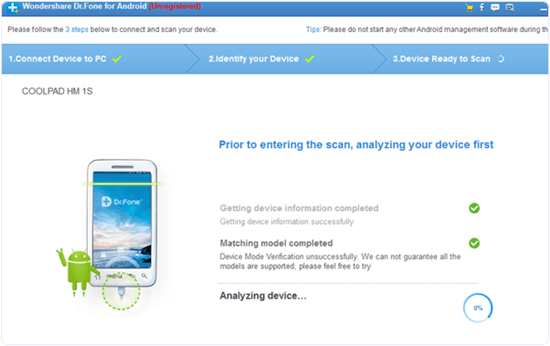
Step 4:- Now click Next.
Step 2:- After installing Android Data Recovery connect your mobile phone with PC/Laptop via USB.
Step 3:- It will automatically detect your device and start processing. After that click on Next and select option what you want to recover.
Step 4:- Now click Next.
Comments
Post a Comment